
Fewer missed checks
Rounds are scheduled or assigned, and supervisors can see missed, incomplete and overdue checks instead of finding out from a pile of sheets.
Operator rounds software replaces paper clipboards and manual log sheets with digital workflows for field inspections.
Operators complete their routine inspections on a phone or tablet, and every reading, defect and observation goes into the same operational record the control room and the next shift use. Mobilog, our mobile operator rounds app, works with Opralog Web, where rounds, forms, limits and reporting are configured.
Mobilog is optional, separately licensed and available for iOS and Android. Operators can carry on offline and synchronise with Opralog when connectivity returns.
Definition
Operator rounds, also called plant operator rounds or inspection rounds, are the routine inspections operators carry out on a set route: checking equipment, taking readings and noting anything unusual. Digital operator rounds, often called digital rounds or electronic rounds, replace the paper sheet with a phone or tablet.
With Mobilog, our mobile operator rounds app, operators complete their checks on the device, even without a signal, and the results go into Opralog when the device synchronises.
01 / Why go digital
Paper rounds get the checks done, but the findings often stop at the clipboard. Digital rounds make the same work count for more.
Rounds are scheduled or assigned, and supervisors can see missed, incomplete and overdue checks instead of finding out from a pile of sheets.
Configured limits, warnings and colour changes show an unexpected value as it’s entered, and the form can ask for an extra observation.
Readings, defects and photographs go into the operational record, where a configured trigger can create a task or notification and the next shift can see them.
Many sites see routine inspections as part of operator driven reliability: operators are on the plant every shift and are often the first to notice a change in equipment condition. Recording what they find, and following it up, is what makes that work.
02 / Paper or digital
The checks stay the same. What changes is what happens to the information afterwards.
| Paper rounds | Digital operator rounds (Mobilog and Opralog) | |
|---|---|---|
| Recording readings | Written on a log sheet, then typed up or filed | Entered once on the device, against the right equipment |
| Unusual readings | Relies on the operator knowing the limit | Configured limits, warnings and colour changes show it straight away |
| Evidence | A note in the margin | Comments, photographs or video with the entry |
| Missed checks | Found later, if someone checks the sheets | Supervisors see missed, incomplete and overdue checks |
| Follow-up | Depends on someone passing it on | A finding can create a task automatically. With the SAP or Maximo interface, it can also create a work order automatically or be raised as one, depending on how it is configured |
| Sign-off | A signature on the sheet, checked later | Supervisors review and sign off the round in the record |
| Shift handover | Copied across by hand, or lost | Findings are in the same record as the handover |
“We used to write up paper rounds and then enter the readings again. With Mobilog, we record them once, which saves time and avoids mistakes when copying them across.”
03 / Inspection routes
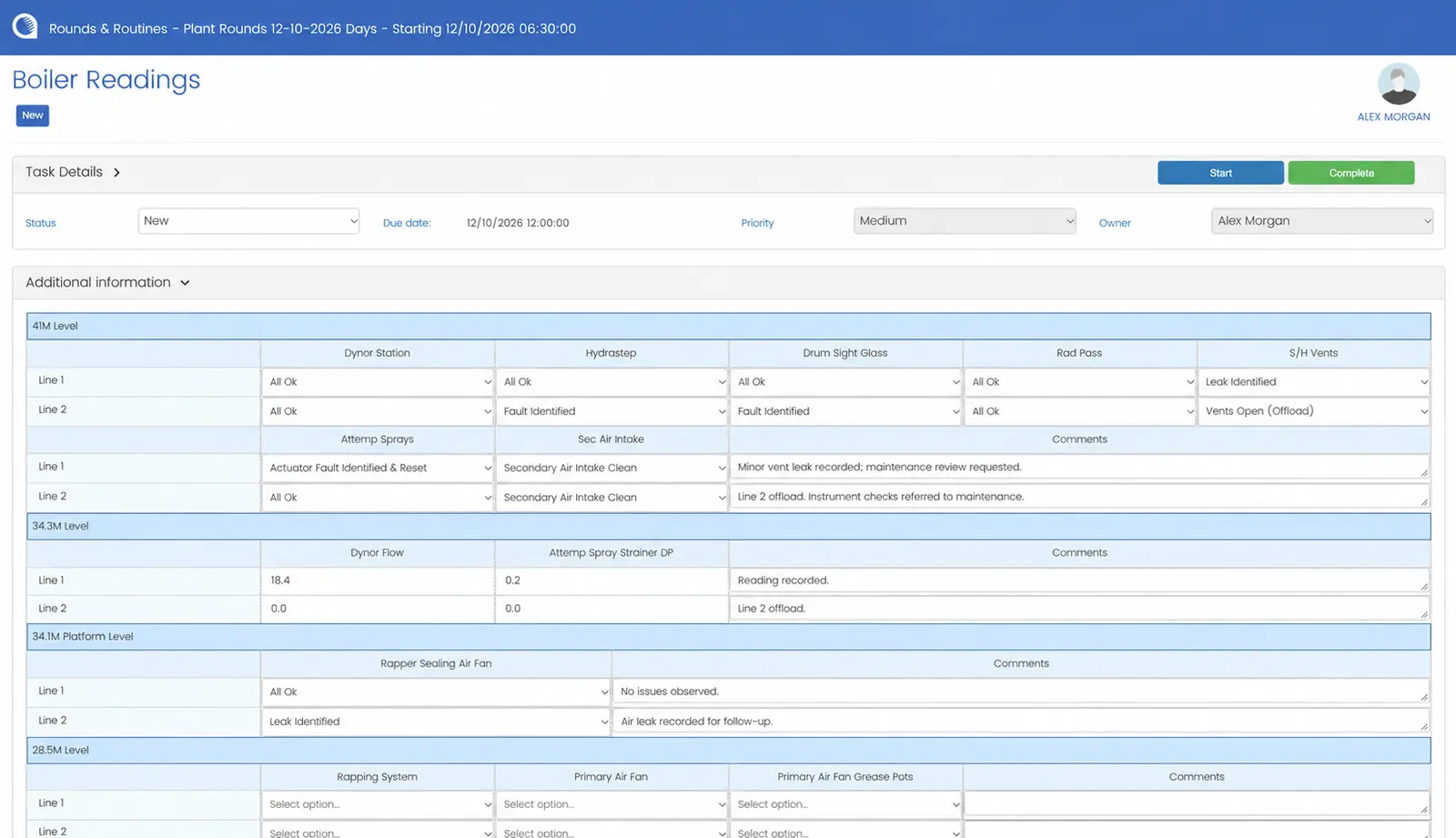
An inspection route sets the order an operator walks the plant and what they check at each point. In Opralog you configure each round once: the route, the equipment, the readings and observations, the limits and the follow-up.
We’ll help you turn your current paper rounds into the first routes.
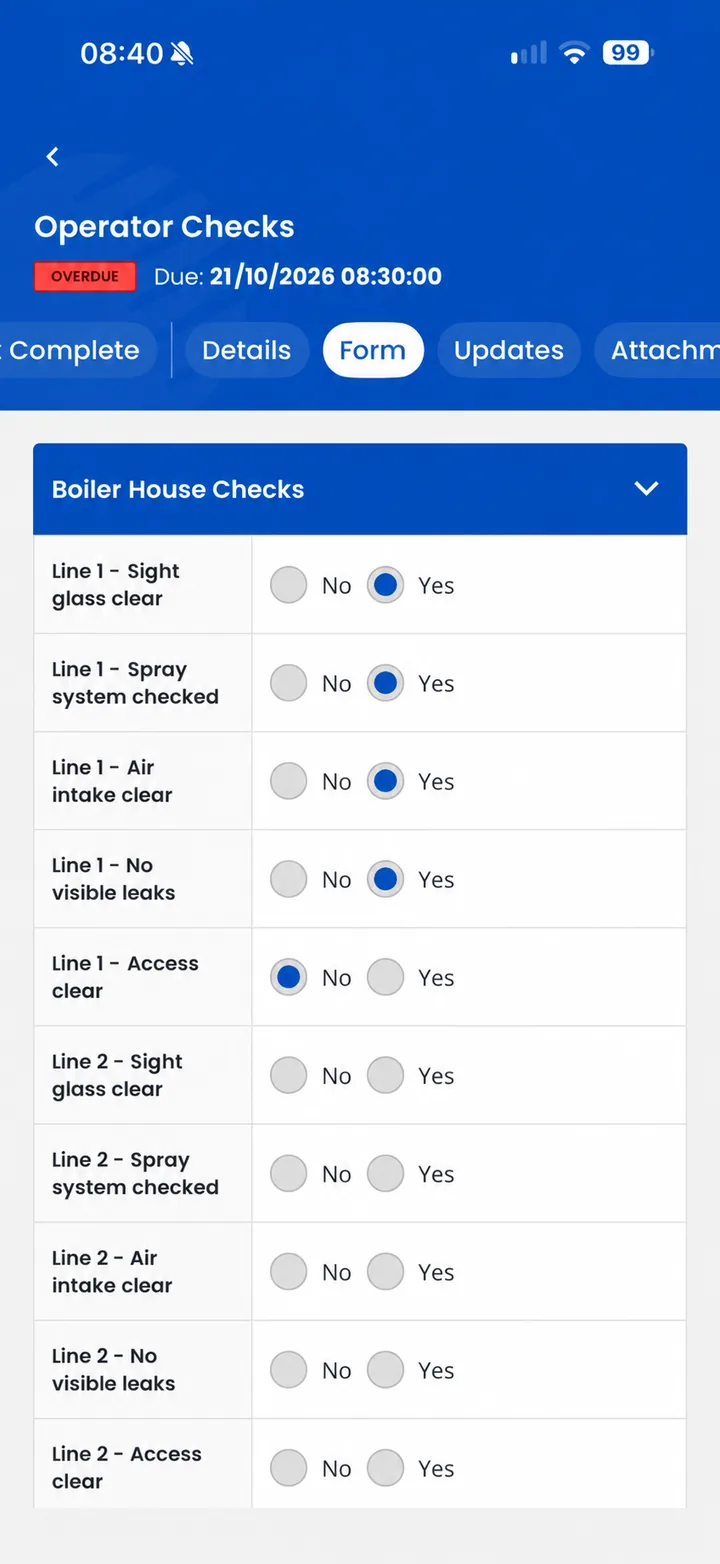
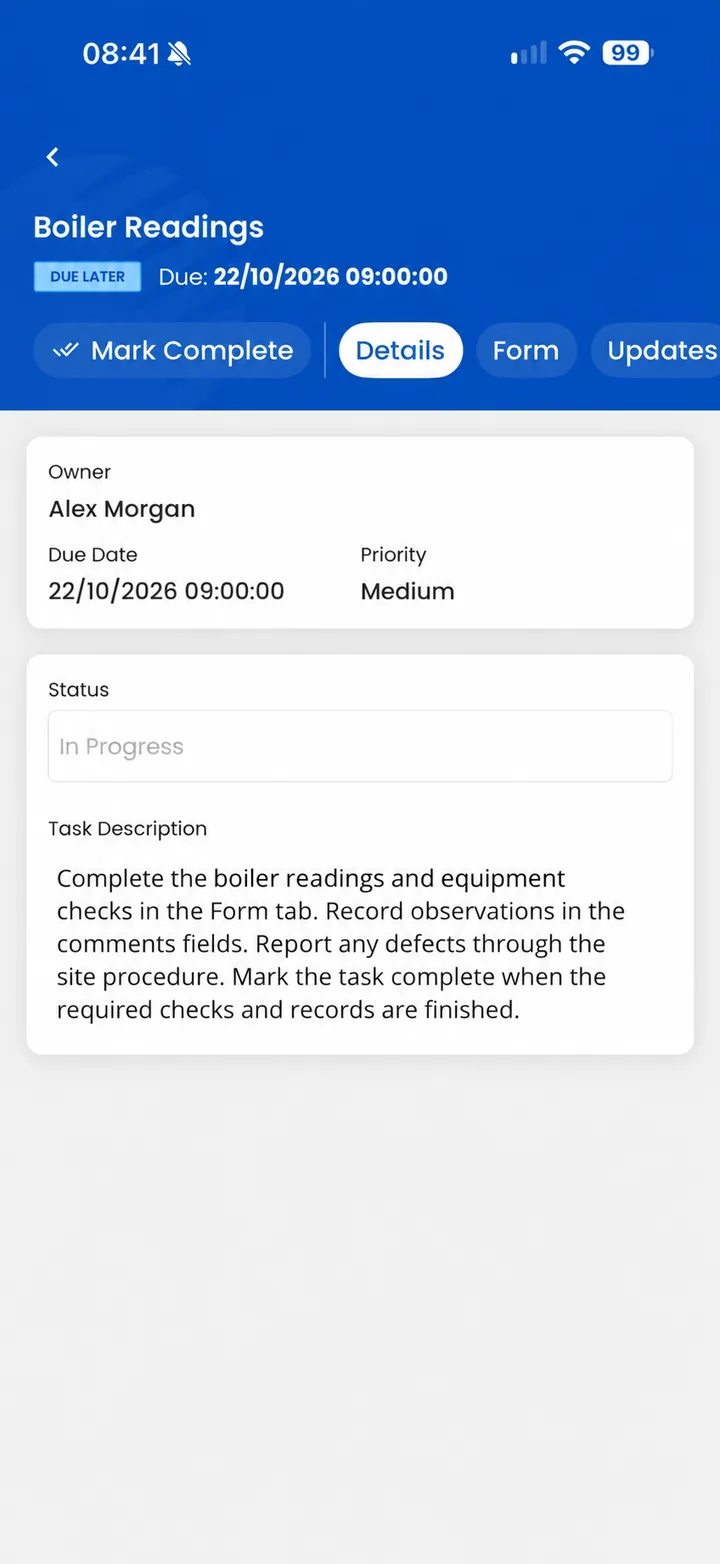
Example route: boiler round
After the roundWith the SAP or Maximo interface, a defect can create a work order automatically or be raised as one, depending on how it is configured. The supervisor reviews and signs off the round.
04 / How it works
Opralog and Mobilog do different jobs in one system.
Forms, processes, limits, warnings, administration and reporting are configured once in Opralog Web. Entries and tasks can be scheduled or assigned for routine duties.
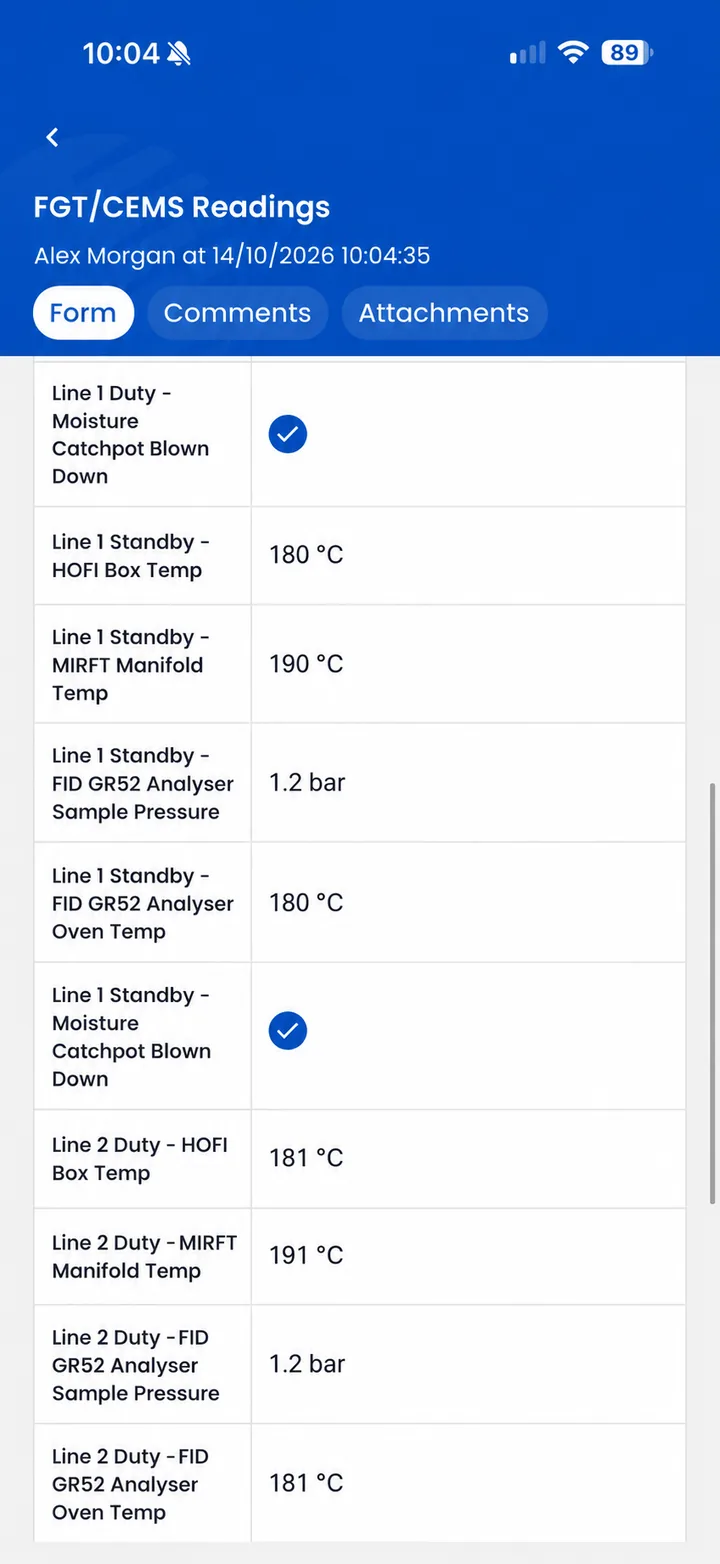
Operators get their forms, tasks and downloaded historic readings on the device. They capture readings, comments, photographs or video, identify equipment by RFID tag, NFC tag or barcode, and see configured limits and warnings as they work.
After synchronisation, the findings are in the central Opralog database for searching, review and reporting. A configured trigger can create a task or notification, and with the SAP or Maximo interface a finding can create a work order automatically or be raised as one, depending on how it is configured. Supervisors can review and sign off rounds.
05 / One record
Rounds and logbooks answer different questions. A round asks: what did we find on the plant? A logbook asks: what happened on this shift, what was done about it, and what does the next shift need to know?
On many sites these live in separate places: rounds on paper or in a standalone app, and the logbook in the control room. Findings then have to be copied across, or they get lost.
Because Mobilog shares the Opralog operational record, synchronised readings, observations and reported defects sit in the same system as the control-room logbooks and shift handover. Forms and processes are configured in the same platform used for operational logging.
The incoming shift and the control-room team consult the same record, and the original observation stays part of the context for the work that follows.
| Operator rounds (Mobilog) | Electronic logbook (Opralog) | |
|---|---|---|
| Where | On the plant, on an iOS or Android device | In the control room and on site, in Opralog Web |
| What | Readings, checks, photographs, defects, observations | Events, actions, instructions, registers, handover |
| When it is shared | After the device synchronises | As it is entered |
| Who uses it next | Control room, supervisors, next shift | Next shift, managers, reporting |
06 / In the field
Everything here is set up in Opralog and used on the plant in Mobilog. See the full Mobilog feature list.
07 / Offline working
Mobilog is designed to work on the device first. Downloaded information remains available on the device, and new entries are retained locally while disconnected, so a round doesn’t stop in a basement, a turbine hall or anywhere else without coverage.
Other teams, and any notifications, only see an entry once the device has synced. Saving it offline isn’t enough. Site procedures should define how operators communicate urgent conditions when disconnected.
We’ll go through devices, preparation and synchronisation for your operating environment with you.
08 / Historians and CMMS
Rounds data is more useful next to the process data and maintenance work it relates to.
Opralog has a standard two-way AVEVA PI interface for PI classic and PI AF. Through OPC and configurable APIs it also works with other historians, including GE Proficy Historian, Aspen IP.21, Canary, DataParc, TimescaleDB and InfluxDB.
When the device has a connection, PI data synced from Opralog appears in Mobilog forms like other form data, so operators can see process data alongside their checks.
Opralog can be integrated with CMMS/EAM and permit-to-work systems, and Mobilog links to SAP. With the SAP or Maximo interface, a finding can create a work order automatically or be raised as one, depending on how it is configured. We’ll look at the systems you use and what needs to move between them.
09 / Follow-up
An operator reports a defect or records a reading outside a configured limit. The form can ask for an additional observation.
After synchronisation, a configured trigger can create a task or notification for the relevant team. With the SAP or Maximo interface, a defect can also create a work order automatically or be raised as one, depending on how it is configured.
Supervisors can see missed, incomplete and overdue checks, alongside the information recorded by operators, and review and sign off the round.
The response is configured around your process. Not every abnormal reading needs the same action.
10 / Industries and deployment
Mobilog and Opralog are used in power, oil and gas and other 24/7 process industries.
Opralog is installed on your own servers or in your private Azure or AWS environment, so your data stays inside your security boundary. Mobilog synchronises with that Opralog environment. Installation requirements and access arrangements are agreed with your IT team.
Read about Opralog deploymentThe platform can be configured for activities such as:
We’ll set up the forms, limits and follow-up to match the way your site already works.
11 / Your questions
Practical questions about routes, devices, offline working, licensing and supervision.
Discuss your requirements ↗Operator rounds are the routine inspections operators carry out on a set route: checking equipment, taking readings and noting anything unusual. With Mobilog they’re done on a phone or tablet, even without a signal, and the results go into Opralog when the device synchronises.
Very little. Both mean operator rounds recorded on a phone, tablet or handheld device instead of a paper log sheet. Electronic rounds, sometimes shortened to eRounds, is the name many power and utility sites use. Digital operator rounds, or digital rounds, is more common elsewhere. Mobilog and Opralog cover both.
Operator rounds record what was found on the plant: readings, checks, defects and observations. An electronic logbook records what happened on the shift, what was done and what the next shift needs to know. With Mobilog and Opralog both go into the same operational record, so field findings can inform control-room review and shift handover.
Yes. Mobilog is designed to work on the device first, so operators don’t need a connection to carry out a round. They can use information downloaded to the device, including historic readings, and capture readings, comments and photographs wherever they are. When the device is back in range it synchronises, and the new entries reach Opralog, other teams and any notifications. When it’s connected, operators also see PI data synced from Opralog.
Start from the way operators walk the plant. Group the checks by area or level in the order they’re done, decide which readings need limits, and set how often the round is due. In Opralog you configure the round once and schedule or assign it, and operators complete it in Mobilog. We’ll help you turn your current paper rounds into the first routes.
Operator driven reliability (ODR) is an approach that uses operators, who are on the plant every shift, to spot early signs of equipment problems. Routine inspections are a large part of it. Mobilog supports it by checking readings against configured limits as they’re entered and turning findings into follow-up in Opralog.
Mobilog works with Opralog Web, which provides the central configuration, administration, operational record and reporting. That way every round becomes part of the same record as the control room’s logbooks. If you still use the Windows version of Opralog, upgrading to Opralog Web opens up Mobilog for your field teams.
Mobilog is an optional app you can add to Opralog Web whenever your field teams need it. It’s licensed separately, and your proposal will set out the licences, technical set-up and any configuration or training you need.
Yes. Entries and tasks can be scheduled or assigned, and operators can also create ad hoc logbook entries when they find something outside the planned round.
Yes. Supervisors can see missed, incomplete and overdue checks, and they can review and sign off rounds. Completion information collected offline becomes available centrally after synchronisation.
Mobilog uses the limits, warnings, colour changes and form rules you set up in Opralog. A reading outside a configured limit can prompt the operator for an extra observation, and after synchronisation a configured trigger can create a task or notification.
Yes. Mobilog can identify equipment by RFID tag, NFC tag or barcode within the configured field process. We’ll confirm any reader hardware with you during the technical review.
Opralog has a standard two-way AVEVA PI interface for PI classic and PI AF. Through OPC and configurable APIs it also works with other historians, including GE Proficy Historian, Aspen IP.21, Canary, DataParc, TimescaleDB and InfluxDB. Opralog can also be integrated with CMMS/EAM and permit-to-work systems, and Mobilog links to SAP. With the SAP or Maximo interface, a finding from a round can create a work order automatically or be raised as one, depending on how it is configured. Tell us which systems you use and we’ll show you how rounds data would fit.
Mobilog runs on any iOS or Android phone or tablet, including ATEX-certified handhelds for hazardous areas. Most customers use intrinsically safe devices, for example from i.safe MOBILE or Bartec. If you plan to use RFID or NFC tags or barcodes, we’ll agree the reader hardware with you.
12 / See it in context
Bring one of your current inspection rounds or forms. We can demonstrate how it could be configured in Opralog, completed in Mobilog and reviewed by supervisors and shift teams.
Include an example of an abnormal result so we can explore the follow-up as well as the data capture.
Book a demo